Dreaming of Virtualized Graphical Desktop Personas
What if my desktop's main operating system was a minimalistic hypervisor which ran those different "personas" as virtualized environments such as containers or VMs? What if each of the personas were essentially an appliance, in control of most of the hardware when running, but manageable via the hypervisor over SSH or similar? Could the penalties of virtualization be low enough for these personas to function well? This idea, and these questions, have lived in my mind rent-free for several years now.
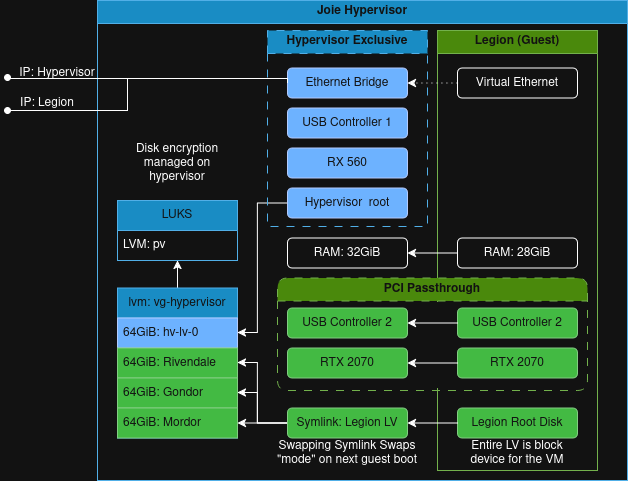
My hardware has drifted since I first set up the machine. My code is all neatly filed away on my self-hosted GitLab, and all of my files are on our file server. I'm in a position where I could easily manage a clean-slate wipe, and this kind of experiment will help me understand the limits of virtualization a little more viscerally. Also, I think it's a cool concept and am easily excited by crazy setups like this.
The Graphical Elephant In The Room
My research seems to indicate that there is a community of people who have done this in the VFIO subreddit, so I know it's possible. I've heard the term GPU passthrough, and I have played with NVIDIA's Container Toolkit to use CUDA in OCI containers, but full VMs are different. When dealing with full VMs in KVM/QEMU, the two main options I've found are either the kernel driver vfio-video for graphics performance enhancement, or vfio-pci allowing the guest to manage the device in its entirety.
The vfio-video driver is meant to provide some performance for OpenGL and Vulkan and it is better than many of the other options for running Windows in KVM. When I experimented with it in the past, Minecraft would run but it was not what I'd consider playable. I'm hoping that PCI passthrough will be the way to go.
PCI passthrough comes with some benefits, such as the full-ish speed use of those PCI devices, and some deficits such as the fact that those devices bind to the kernel module vfio-pci and become exclusive to the guests you assign them to. Working with headless machines is normal for me, however having the ability to connect a monitor becomes key when troubleshooting. To allow both, I acquired a low-powered RX 560. With two graphics cards installed, I can dedicate the low-powered one to the hypervisor and kernel-sharing VEs (containers), and I can passthrough my powerful RTX 2070 SUPER to my main appliance. If I pair this with the passthrough of a USB controller, we would have the illusion of two machines in one case.
Virtualization Environments
The Appliance Console
Arch Linux will make a great hypervisor. The kernels are fresh, the documentation is swanky, and I have found Arch to be very minimalistic by default with the ability to grow as large as you like. In this case, the hypervisor should remain as small as possible and I believe Arch's footprint will be smaller than Ubuntu's for this. I've also had a great experience with it on my laptop recently. It does mean I have to configure it all myself, but when has that ever stopped me?
All of the appliances will have the same hardware and will differ only by their data (including their operating systems). Only one appliance may run at a time due to PCI passthrough and the fact that they are meant to have the bulk of the machine's physical resources. I've decided to maintain a single VM called legion as the main appliance console and each appliance will have its own cartridge in the form of a virtual hard drive. I will swap out the cartridge as a means of switching personas by using a symlink for simplicity. This would be the physical equivalent of swapping hard drives between activities, but symlinks make it far easier and no physical power-down is necessary. Given all the dark magic involved here, I figured a Middle-earth theme would go well for the appliances.
The Appliance Cartridges
The first appliance will be Rivendale (Rivendell, but with nicer spelling), a development machine running Ollama in Ubuntu for my LLM work where applications consult an oracle. This will do double duty as I want the bulk of my machine's resources available when compiling stuff and when Ollama is running.
The second, Gondor, will run Steam and Linux games in Ubuntu. Both Ollama and Steam are strong in Ubuntu and it's my default distro anyway. I'm a big fan of Proton and what they've done for the Linux and Wine communities and have primarily gamed on Linux for nearly the last decade as a result.
Finally, Mordor will exist for Windows games. Microsoft has made Minecraft Bedrock Edition inaccessible via Wine using their Microsoft Store bindings and new execution model. This means to play Minecraft with my family, Windows is a requirement. While I have enjoyed Java edition, especially the modding community there, family members who play include grandparents, uncles, and friends on various devices. There are a few other games on the Origin store which we might engage with as well, but Minecraft is the primary concern here.
Next Steps
With all this in mind, I've started working on some automation to create this environment repeatably and record the process. I've managed to get it working once by hand and I've made some mistakes with Secure Boot which have required flashing my BIOS with an external USB CH341A programmer to fix. You can read about that adventure here.
I'm excited to jump back into this, as soon as the construction in my basement allows.